Design a building without needing to see it. The design lives in a plain text file — read back by ear, by touch, and on screen — so a blind student can author architecture in the same studio as sighted classmates.
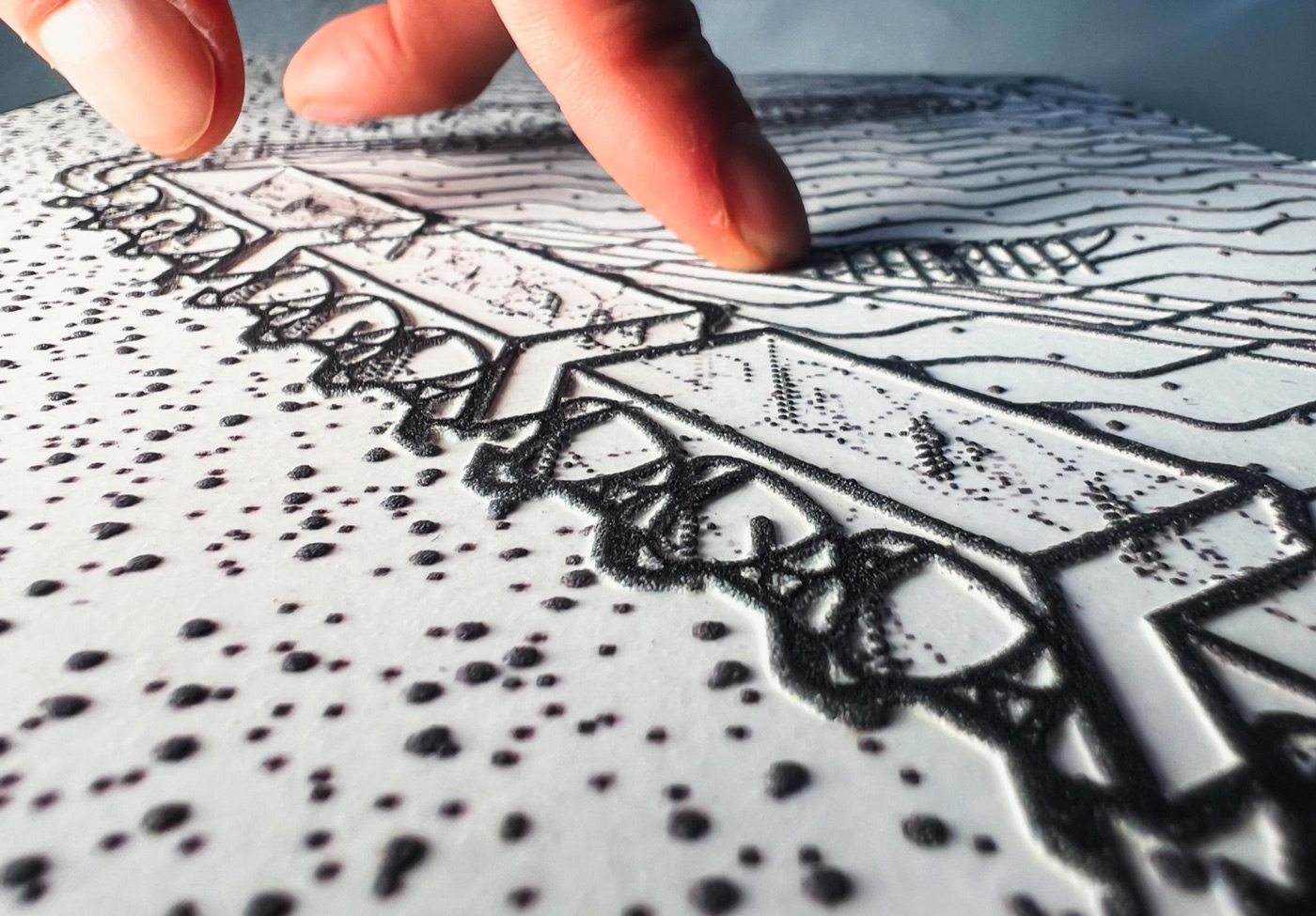
A swell-paper tactile axonometric, read by hand — the design made physical.
What each tool doesBring · It does · You get · Needs
Nothing to start — an empty model or the sample — or a state.json you saved before.
It does
Typed commands or plain language set out bays, walls, corridors, doors and windows, and every change is confirmed in words. Soundwalk walks the plan by keyboard, a stride at a time, with walls blocking and doors passing. Audit checks doors, corridors, stairs, ramps and the way up to every level against cited ADA and IBC minimums and says what plan geometry cannot prove. Acoustics speaks a room's reverberation and sends it to the Acoustician to hear.
You get
state.json (re-openable), a PIAF image or a pin-up set of one sheet per phase, an STL mesh, a RhinoPython script, a Rhino .3dm as surfaces or mesh with layers and braille labels, the model description and label schedule as braille .brf, and the command log — all matching what is on screen.
Needs
Nothing for the console, the forms and every export. The AI assistant needs sign-in: Change edits the model, Ask answers and measures and can never edit.
A Rhino .3dm — or an OBJ, STL, PLY or GLB, a phone scan included.
It does
Cuts plans, sections, elevations and axons at a real architect's scale, never squeezed to fit; removes hidden lines; gives every layer a hatch or texture a finger can tell apart; adds a title block with the scale in print and braille and a tactile scale bar; tiles a big drawing across sheets, each labelled. A section pair prints the cut and the depth behind it as stepped bands you count with a finger, the step stated in braille. Site Walk walks a scanned site by keyboard, with your own field recordings placed where you made them.
You get
A PIAF PNG or one PDF of the whole set at 8.5 × 11 or 11 × 17 in, a millimetre-true SVG, a braille title card (.brf) — and, when the PIAF is down, a low-relief STL for a 3D printer, a few layers thick and watertight; a section pair comes out as one watertight STL at the scale you pick.
Needs
No sign-in. Everything runs in your browser; the model is never uploaded.
Reads the scan aloud — its spans, holes, ground plane and resolution — then levels the floor, scales it by a measurement you taped on site, crops it, places it, and rasterises it at a model scale you pick.
You get
Watertight STL chunks sized to your printer bed, zipped with an assembly map; a base to mount them on (a laser-cut DXF or a printed STL), braille tag inserts and a fit coupon; and the same ground full size as a Rhino .3dm with contours, as surfaces or mesh.
Needs
No sign-in. A heightfield keeps the top surface only, so canopies flatten — the tool names where, and by how much.
The wire you tie with (16-gauge rebar tie wire by default), a printer, and the grid you want — a preset does the rest.
It does
Makes either of the two tactile boards this collaboration produced. The PLATE lays out a hole every 1/8 or 1/4 in on a square grid, a polar grid of rings and spokes, or both on one plate for a round building on a square site; puts Braille rulers along two edges with a tick at every hole and a numeral at every inch, a raised triangle at the origin, raised inch lines or wire channels between the holes; reads every number back — the holes, the thinnest wall, the pieces the bed needs — and warns about what will not print.
You get
A watertight STL built and checked in your browser (one piece, or cut between the holes to your printer's bed), a Rhino .3dm as editable surfaces or the print mesh, a fit coupon to size the holes to your wire, and the read-back as a .brf.
Needs
No sign-in. The LATTICE TILE is the board that was printed and approved — square holes on the same 1/8 in pitch, the wire channels on the back, the ruler engraved into a continuous top face so nothing can break off, and finger edges pinned with filament so two tiles hinge flat or at 90°; its only control is its size in cells, because its other dimensions came out of John’s file. Print the fit coupon first — a printed hole comes out a little under its modelled size, and the coupon is how you find the snug one.
A photo, map, plan scan, diagram or PDF page — or any picture on this site, through its ⠿ Tactile button.
It does
Sorts tone into two to twelve bands (warning past five) and fills each with a texture a finger can tell apart, redraws line work at a real ridge width, drops anything smaller than a fingertip can find, adds a braille key, and reads the whole plate back in words. A loupe and a fingertip-sized pad let you check it on screen at true size.
You get
A PIAF PNG or PDF, a millimetre-true SVG, the cleaned picture — and, when the PIAF is down, a low-relief STL for a 3D printer, with the tone bands stepped as terraces if you want them.
A sound — recorded here from the microphone, dropped in as WAV, MP3, M4A or OGG, or one of five worked examples.
It does
Measures the recording and prints the measurement itself, with nothing invented in between: time runs left to right, pitch upward over six octaves (125 Hz to 8 kHz), and loudness is height. Every frame is read and each cell keeps the loudest thing in it, so a click of a few milliseconds still stands as a wall. The axis is cut into the tile's outline — notches in the bottom edge for seconds, notches in the left edge for octaves with a double notch at 1 kilohertz, and the origin corner clipped off — so nothing on the plate is raised except the sound, and the tile cannot be read upside down. It reads the surface back in words, and never names what made the sound.
You get
A watertight STL at the scale you pick, a Rhino .3dm as surfaces or mesh with the tile's real outline as a curve, and the tile map as a PNG.
Needs
No sign-in. Everything runs in your browser and the recording is never uploaded. Whether a hand reads a spectrogram as the sound it came from is the open question this tile exists to answer — it has not been tried with a blind reader.
Turns the feed into a high-contrast dither or halftone — ten screening methods, at a pitch and angle you set — and freezes a frame.
You get
A PNG or JPEG frame for print, black-and-white or CMYK. A dither is a print look, not a tactile method: under a hand a halftone reads as a flat field, which is why Tactile Image bands and textures instead.
Measure a wall's surface from a phone at the wall.
Bring
The texture rig and a phone: six or more photographs of one patch of wall, the lamp clicked round the ring between shots.
It does
Photometric stereo: each frame is linearised out of sRGB, the light's direction and falloff are worked out per pixel from the rig's geometry (the lamp is inches away, so it swings across the patch), and the frames are solved together for the surface's slope and then its height. A capture calculator runs before any photo is taken — which detents to shoot, the grazing angle, the headroom the falloff needs — and every frame is checked for blown highlights and a moved camera while the rig is still against the wall. Every readout is also a spoken sentence.
You get
The relief read back in thousandths of an inch — how deep the mortar is cut, how proud the brick sits — and, through Export, a printable STL tile of the patch, the height map as a PNG with its scale written into the filename, and the normal map as a PNG.
Needs
No sign-in. Everything runs in your browser and nothing is uploaded. Its accuracy is pinned against synthetic surfaces of known height; no real capture with the lamp working has come through it yet.
Describe a picture on your own rules, and check the answer.
Bring
Any picture.
It does
Writes a one-line alt attribute and a Macro / Meso / Micro description on rules you set — how long, what it leads with, whether it may estimate a size or name a building — then audits its own answer against those rules. Coach it in plain language; save the set-up as a preset.
You get
The alt text and the description, ready to paste — or a whole batch of pictures at once, exported as CSV, text or HTML.
Needs
Sign-in — it spends an AI call. The picture goes from your browser to the model once and is never stored.
Print a model on the Bambu P1S without opening Bambu Studio.
Bring
An STL, 3MF or OBJ model, or a finished .gcode.3mf print file.
It does
You choose what the print is for and change any setting in plain words; Bambu Studio slices it on your own computer through the Print helper. Every print file is then checked: the right printer and plate, a warm enough bed, nothing off the plate or in the purge corner, and first layers that will stick.
You get
A spoken report — time, filament, supports, problems — and the checked print written to the SD card, with the steps to start it on the printer.
Needs
A Windows computer with Bambu Studio and the Print helper installed. No sign-in.
What it is
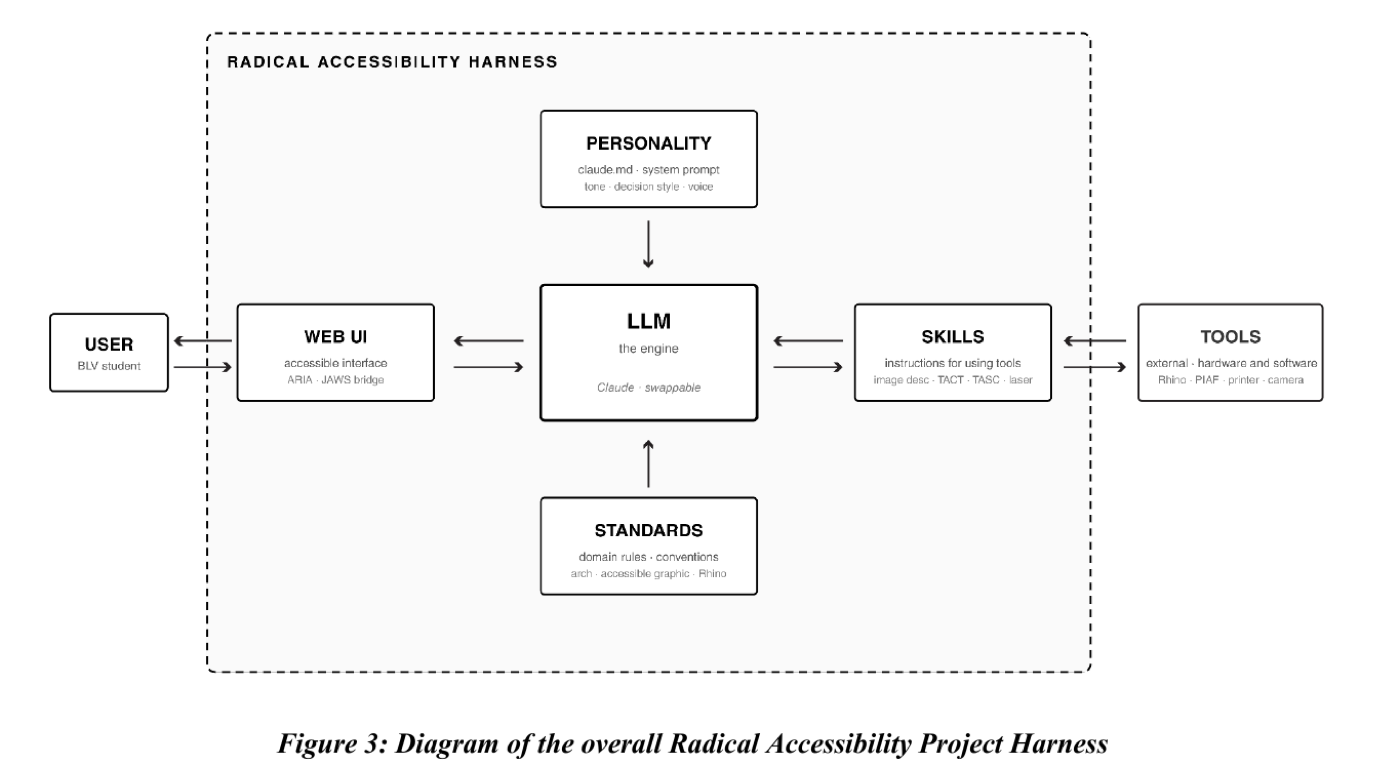
RAP is studio research with a working toolchain, co-designed with a legally blind architecture student — the project’s primary user. The move: the design lives in one plain-text file (state.json), and everything else — the 3D viewport, the tactile print, the spoken description, the command line, the AI assistant — reads or writes that file. The screen becomes one channel among several instead of the place the design lives, and the aim is parity, not accommodation: the student runs on the same studio infrastructure as everyone else, not on bespoke sighted help. The desktop harness is local-first and open-source — a Python CLI plus Claude Code, with a Watcher rebuilding the model in live Rhino 8 — and the nine browser tools above are the same pattern with no install.
The Harness topology — a swappable LLM engine wrapped by personality, skills, and standards, reached by the student through an accessible web UI.
How it works — Controller, State, Watcher, Channels
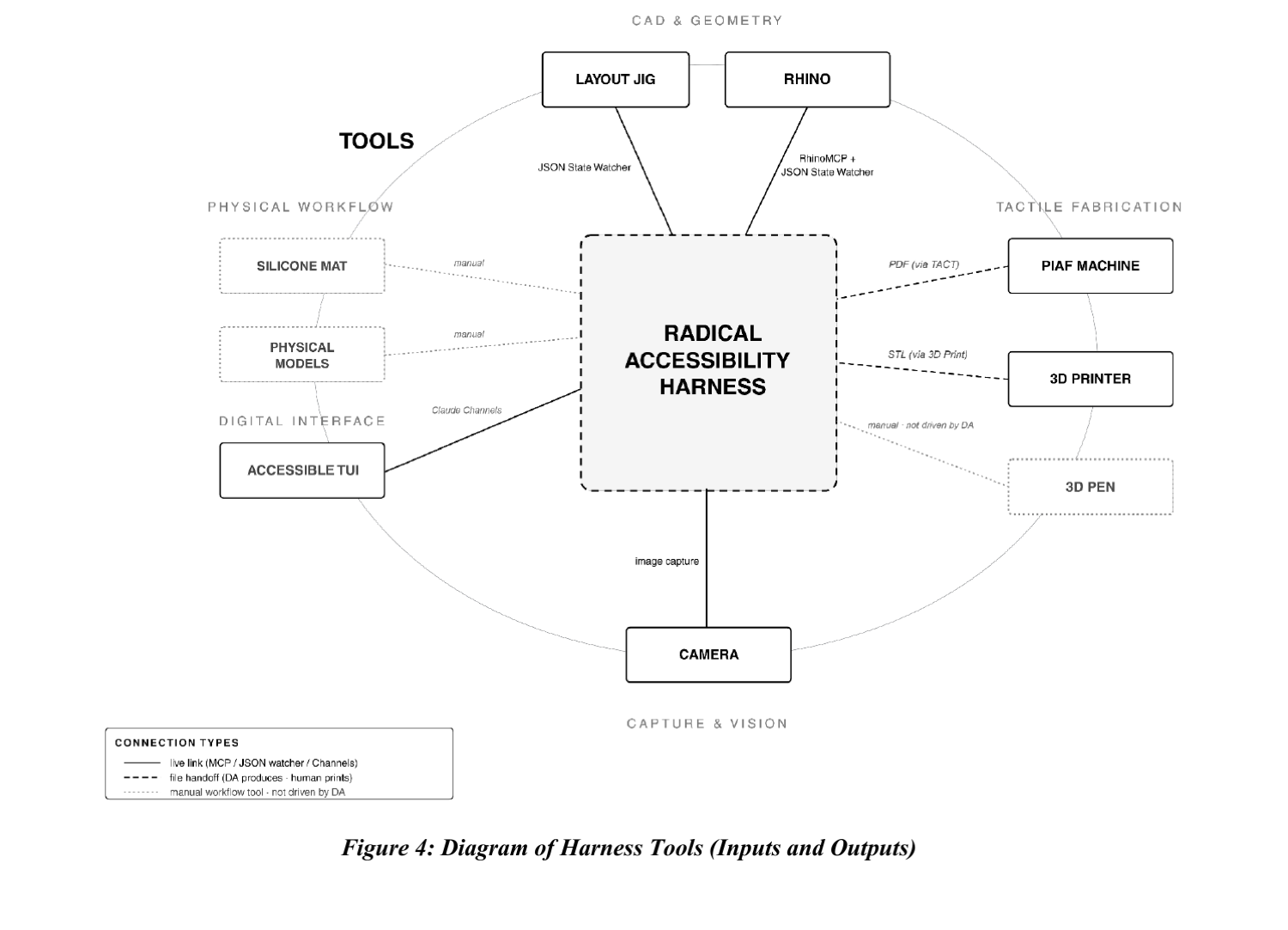
The design is a single canonical state.json. A Controller (a command line) edits it, a Watcher rebuilds it in Rhino, and Channels make the AI assistant legible to a screen reader. Everything else either writes to that state or reads from it — and RAP Studio’s console speaks the same grammar, so you can try it now.
The Harness and its tools — live links (CLI / JSON watcher / Channels), file hand-offs to the tactile printers, and manual studio tools, all organized around the canonical state.
The dominant trajectory of AI-assisted CAD keeps the viewport as the source of truth. RAP makes the CLI the authoring layer instead — and reduces Rhino to one renderer among several that consume the canonical state. Same inputs → same state.json → same geometry, every time.
ROLE 1 · QUERIER
Ask the model
“How many windows are on the east elevation?” — answered from the JSON state, spoken back to verify intent in lieu of viewing.
ROLE 2 · CODER
Edit the model
The assistant drives RhinoPython to change the state — the student authoring through language and structured commands.
ROLE 3 · TUTOR
Learn the craft
It teaches the underlying Rhino and RhinoPython concepts, so the assistant is a bridge to self-sufficiency, not a black box.
The first two roles run today in Studio’s assistant (sign-in): Ask is the querier — it answers, measures, and audits, and can never edit — and Change is the coder. The tutor is the desktop harness’s role.
The five constitutive properties
The Controller, the State JSON, the Watcher and Channels, the tactile renderers, and the linguistic renderers don’t add up to a single tool — they constitute a pattern. These five properties are what make it one.
01
Sense-agnostic state
The canonical design lives in a JSON file that privileges no modality. Any renderer can be plugged in to consume it.
02
Renderer parity
The visual viewport, the tactile media, and the CLI and web interfaces all consume the same state. The viewport is one renderer among several, not the source of truth.
03
Multiple authoring channels
CLI commands, voice transcribed to CLI, direct JSON edits, and LLM-translated natural-language intent all reach the same state. The student picks the channel that fits the task.
04
LLM skill scaffolding
One model, three scaffolded roles — querier, coder, tutor — so the assistant is a ramp toward independence, not a permanent dependency.
05
Auditability
Every action is reversible and inspectable; the state is human-readable and version-controllable; every command and tool call is logged. “Trust but verify” is enforced by the substrate.
Inside the harness — the five capabilities
The renderers and channels that hang off the canonical state. Each adds commands without touching the others, and follows one rule: if it can’t be heard, felt, or read by a screen reader, it doesn’t ship. All five have a counterpart running on this site — each entry says where.
01
Controller & Layout Jig — the authoring layer
The Controller is a command-line interface the student uses to edit a persistent state.json directly. Commands like set bay A rotation 30 or wall A on state design intent as structured language, and each returns a spoken-style confirmation. The design lives in the JSON as parameters — pure text — while a small Rhino-Python Watcher reads that state and rebuilds the model. The CLI is what lets a blind student drive and inspect geometry without ever touching the inaccessible GUI.
Runs as — a Python CLI (stdlib only) editing the canonical State JSON.
On this siteRAP Studio runs the same grammar in your browser — console, forms and read-back, with every export: state.json, PIAF image, STL, RhinoPython, and a .3dm that opens in Rhino 8 with layers, phases and braille labels.
02
Digital Assistant — querier, coder, tutor
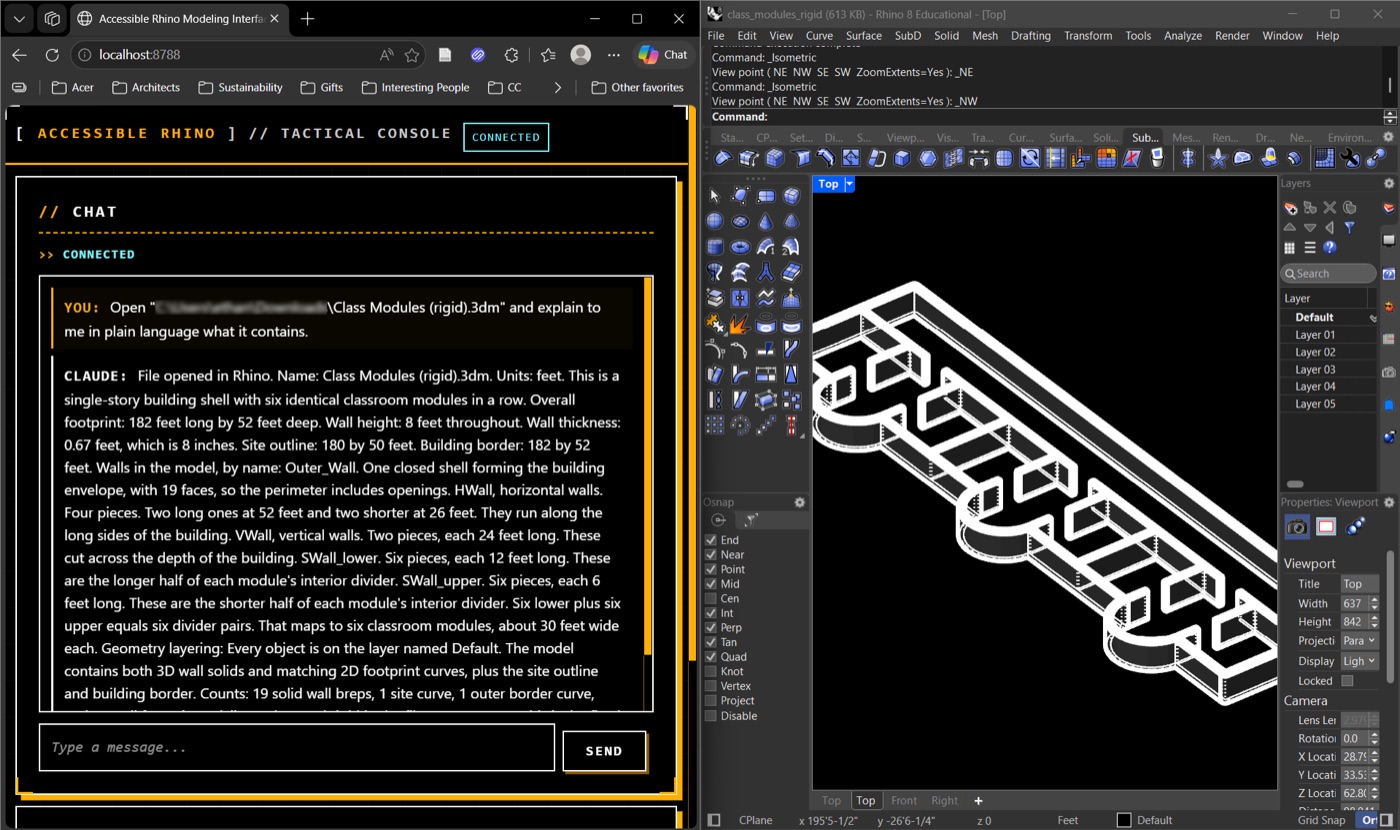
The AI layer wraps one model in three coordinated roles: querier (“where is the front door?” — answered from the JSON state), coder (drives RhinoPython to edit the model), and tutor (teaches the underlying Rhino concepts so the student grows toward self-sufficiency). Because default agent terminals are illegible to screen readers, Claude Code’s Channels re-render every turn as structured, navigable HTML — ARIA landmarks, tool calls in disclosures, and a live state.json tree.
Runs as — an LLM (Claude Code) over MCP, surfaced through accessible Channels.
On this siteStudio’s assistant (sign-in): Change edits the model; Ask answers, measures, and runs a spoken audit against cited ADA and IBC minimums — and can never edit, so verification stays separate from authorship.
03
Image Describer — drawings into structured text
Architectural images — a plan, photo, section, or diagram — are described as a navigable hierarchy rather than a flat paragraph: Macro (the whole composition), Meso (its parts in moderate depth), then Micro (finer-grain features and measurements). The same schema turns reference images and classmates’ work into something a screen reader can traverse — and, inverted, lets description itself become the act of authorship.
Runs as — a vision model with a Whole-to-Part description schema.
On this siteAlt Text — any picture becomes a web-ready alt attribute plus the Macro / Meso / Micro bands. Every rule of the description — length, what it leads with, whether it may estimate a dimension or name the building — is a setting the describer is then audited against; coach it in plain language and save the whole configuration as a preset. Its one-thumb phone shutter is Quick Describe: point the camera at anything — a pin-up, a model, a room — one tap, and the description is spoken aloud. Both sign-in — they spend an AI call.
04
TACT — tactile graphics (PIAF swell paper)
Converts a design into a physical raised-line graphic readable by touch. Output is laser printed on PIAF microcapsule paper with carbon toner and fed through a heater — the carbon absorbs heat, the capsules swell, and black lines rise off the page as ridges. TACT renders straight from the state file or converts any image with tuned presets, holding black density in the 25–40% band where touch reads best, with Grade-1 (uncontracted) braille labels that stay paper-absolute at any model scale.
Runs as — pure-Python pipeline + its own MCP server (7 functions).
On this siteTactile Drawings — any Rhino .3dm into millimetre-true plans, sections and axons, each layer given a texture a hand can tell apart. Tactile Image — a photograph, map or scanned plan simplified into textured bands with a braille key. Image Cleaner rescues a rough phone photo or scan into clean black-on-white before it goes to press, and Dither Camera turns a live camera feed into a high-contrast dither or halftone, framed for PIAF.
05
3D Print — tactile scale models
Generates a watertight triangle mesh from the same parametric model — no Rhino dependency — validates solidity, and exports a binary STL scaled at 1:200. The printer lives in the studio, not a separate fabrication lab, so the physical object a student lifts off the bed during review stays in sync with the design they are editing by text and touch.
Runs as — pure-Python STL export to a Bambu Lab 3D printer.
On this siteStudio exports an STL mesh of the plan you authored — walls, slab and marks as overlapping closed solids the slicer unions — one click from the plan to the studio printer.
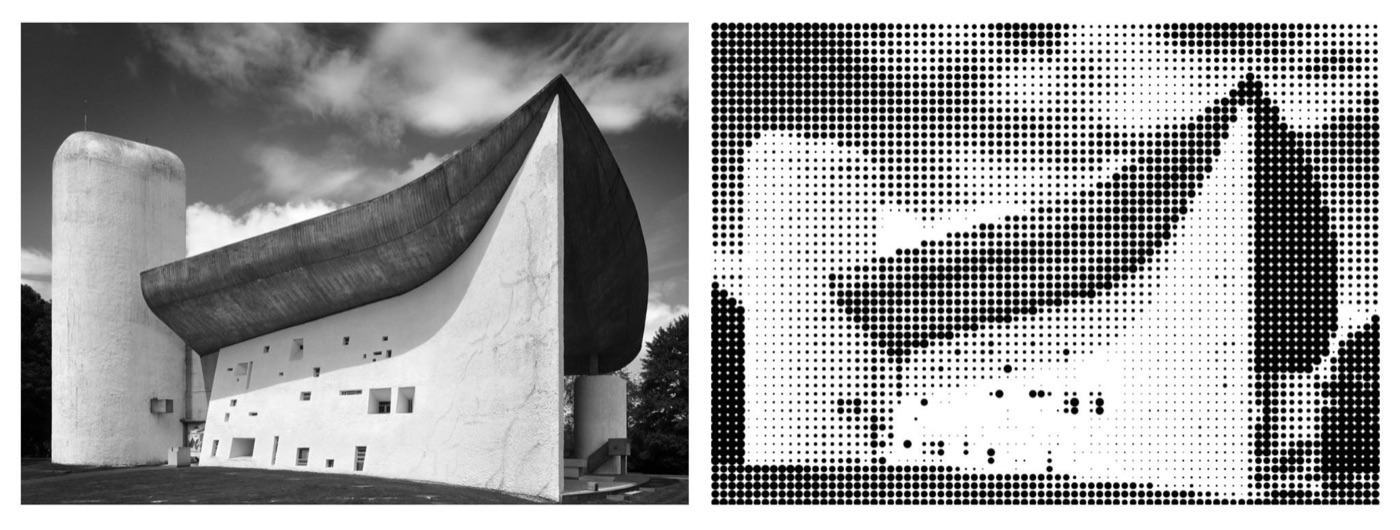
The accessible web client — agent turns re-rendered as navigable HTML with a live state tree — beside the Rhino viewport. Image Describer: a perspective photograph and its half-tone tactile translation — tone survives, depth does not. (Notre-Dame du Haut, Le Corbusier, 1955.)
The Desk — where the loop physically closes
Tactile authorship sits at a workstation the team calls The Desk: an all-in-one that co-locates the CLI host, the PIAF printer, a consumer 3D printer, scanning devices, and ergonomic analog tools at fixed positions. A print emerges within arm’s reach; a 3D-printed mass lifts off the bed without changing rooms; the scanner for reading classmates’ work is on the same surface. The loop — author, verify by touch, return to the CLI, revise — becomes one continuous bodily routine rather than a walk between rooms. It is deliberately low-cost and reproducible: any program can co-locate a PIAF and a desktop 3D printer with a CLI workstation, and the rest is mostly software.
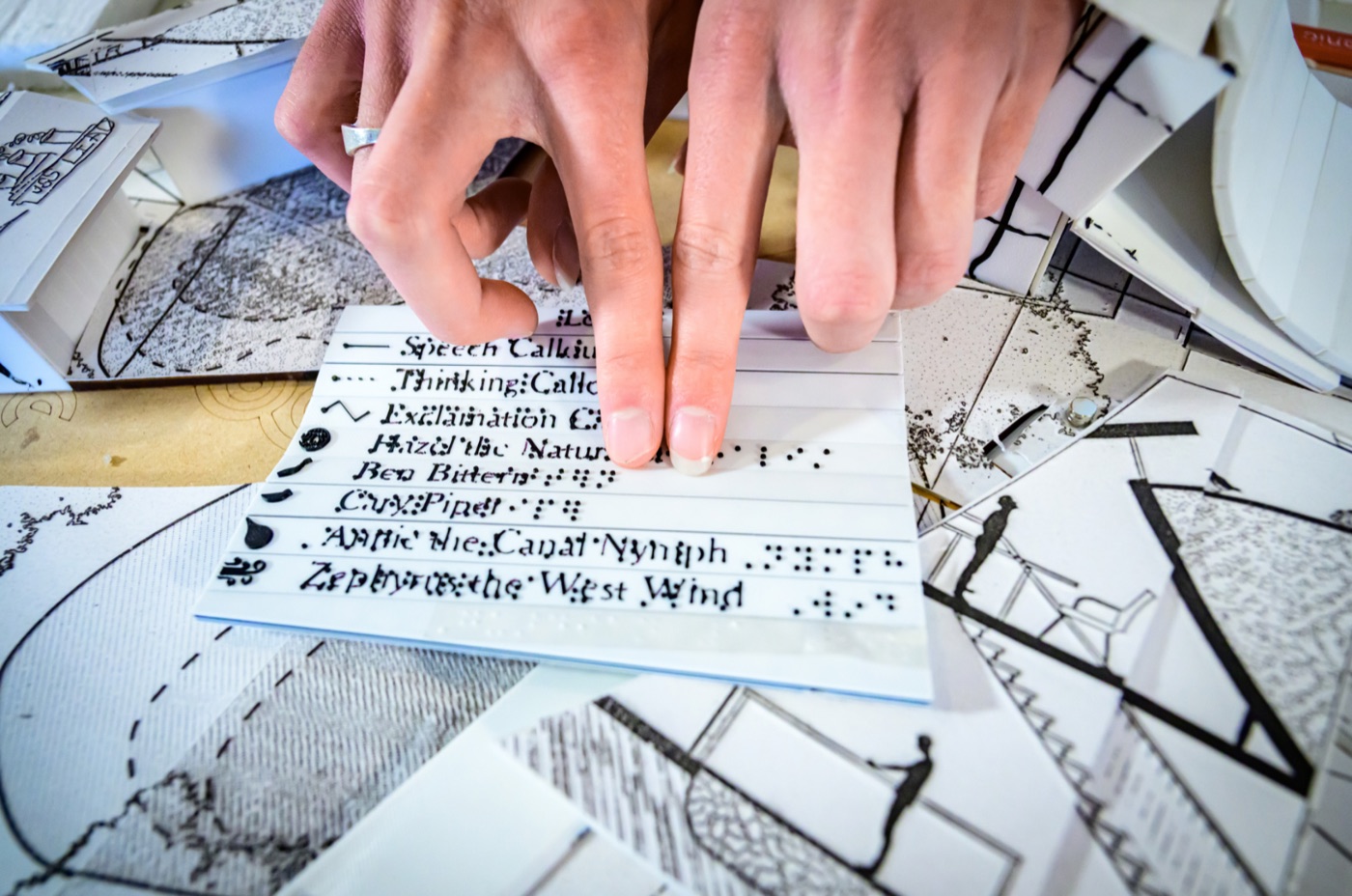
Reading a 3D-printed braille / English legend alongside PIAF swell-paper plans and sections at The Desk.
One loop, end to end
Set out a small school, hear it back, audit it, and produce something to hold — the command, read, print, feel, revise cycle a studio runs, with the medium expanded rather than removed. Every line below is a command RAP Studio’s shipped interpreter accepts, shown with its real confirmation. The spoken ADA/egress audit is in the grammar: audit checks every door, portal, corridor, stair and ramp — and whether every upper level has a way up — against cited minimums, and says what plan geometry cannot prove.
>> set bay A bays 6 3 OK: Bay A grid = 6×3 modules.
>> corridor A width 8 OK: Bay A corridor width = 8 ft.
>> aperture A add d1 door x 0 2 3 7
OK: Added door d1 to bay A (x-wall gridline 0, 3×7 ft) — door d1
on the south wall (3×7 ft at 2 ft along, hinged at the west end,
swinging in).
>> audit AUDIT — 0 failures, 0 warnings, 1 pass. A plan-geometry
check, not a code certification.
PASS — Door d1 (bay A): 3 ft (36 in) wide — meets the 32 in
clear-width minimum (2010 ADA §404.2.3).
UNCHECKED — Widths are the model's nominal opening widths;
leaf, stop and hardware deductions are not modeled.
>> tactile3d on OK: Tactile-3D export ON.
>> describe # read-only: the Macro / Meso / Micro read-back# then the export buttons write the sheet and the model:# PIAF image → print on swell paper · heat · read by hand# STL / .3dm / state.json → the printer, Rhino, or the desktop Watcher
The argument
Architectural education is overwhelmingly visual. Studio relies on drawings, models, screen-based software, and pin-up critique, and the underlying pedagogy assumes a sighted learner — so for a blind or low-vision student, nearly every routine task, from drafting to peer review, currently requires sighted help. Mainstream CAD and BIM tools (Rhino, AutoCAD, Revit, Adobe) tested against the JAWS screen reader are simply not compatible. Incorporating non-visual methods is therefore a precondition, not an accommodation.
Prior accessibility work in this domain has been tool-shaped — a tactile graphic generator here, an accessible CAD substitute there, an alt-text rubric — each retrofitting access onto a pedagogy that itself remains visual. The Harness is different on two counts: it is a pattern, coordinating every tool around one sense-agnostic representation; and it adapts the LLM agent-harness pattern rather than rebuilding the CAD application as a parallel substitute.
What the blind case revealed is that design authorship in a digital studio doesn’t have to be coupled to any one channel of perception. Semantic clarity, voice and keyboard operability, an auditable state, deterministic output — these aren’t accessibility features so much as engineering virtues that visual tools abandoned for graphical convenience. Building for the case the default toolchain ignores turns out to build infrastructure other studios should adopt anyway.
The wager
Architecture is inherently multi-sensory. The tools we inherited are not.
What it means for the studio
Four implications the blind case surfaced — offered as candidate hypotheses drawn from a single case over four semesters, not yet a validated portable practice.
An explicit textual design state
A stable, version-controllable, queryable record of where a design stands — supporting voice, CLI, direct JSON, and natural language without ad-hoc adaptation.
Multi-modal critique
Once state is sense-agnostic, critique can run through tactile prints, spoken description, and the viewport in parallel — the pin-up stops being the privileged forum.
AI-scaffolded verification
Ask the model what is actually in your file — “what did I just do?”, “what layer are the columns on?” — grounded in the textual state rather than a screenshot.
Protocols designed for access
“Using your words,” Macro/Meso/Micro alt-text, written notes alongside drawings — communication designed for access tends to beat communication retrofitted for it.
What’s next
The pattern is built to extend — new renderers and channels plug into the same state. On the horizon:
Spatial audio of a design
The first step is live: Studio’s Soundwalk walks the plan on foot — every step spoken, walls block, doors pass, with footstep and wall-proximity audio. Its acoustics verb speaks a room’s reverberation and hands the room to the Acoustician to hear, and Tactile Drawings’ Site Walk plays field recordings binaurally where they were made. Next: binaural rendering of the authored plan itself — volume as reverb, ceiling height as pitch.
Vibrotactile models & haptic gloves
Surfaces and gloves that encode material, load, or edges as vibration you feel under the fingertips.
Live pin-array tactile display
A refreshable pin surface that redraws the current state in real time — a dynamic tactile screen, not a static print.
Live AI scene description
Continuous narration during studio, pin-ups, and site visits via smart glasses — including Socratic questions about the space.
RAP in the rest of the toolkit
The describer is not fenced into this page. The Librarian writes RAP alt text on any picture it turns up, without leaving the page. The Archivist keeps a Tactile Library (sign-in) — a shelf of reference images curated for the PIAF printer, each carrying the describer, a companion QR + braille card, and a preflight before anything is committed to swell paper. And every picture across the toolkit carries the ⠿ Tactile button, which drops it straight into Tactile Image.
Hearing carries the same non-visual weight as touch. Acoustician auralizes a room — the same phrase spoken through the untreated and treated space, or a real impulse response traced from a point you place in an imported model — so a room can be verified by ear before it is ever seen. It stays filed under Analysis, and Studio reaches it directly: acoustics send opens the room you typed in the Acoustician, and acoustics send level sends a whole floor as coupled rooms.
Radical Accessibility Project — a studio research project at a major public university’s school of architecture, co-designed with a legally blind undergraduate architecture student, its primary user. The write-up: Accessibility Harness & Adaptive Pedagogy for Non-Visual Design Authorship. The work is in progress; code for the Controller, Watcher, and image-to-tactile pipeline is to be released open-source on publication.